

Two situations bring most people to the question of what their cable lineup actually looks like. The first is moving into a new home, where service will be different from the last place even with the same provider. The second is shopping for a new package, where confirming a specific channel is included before signing up matters more than reading a generic feature list.
Both situations need the real channel lineup for one specific address, not a national overview, not a marketing summary, and not a third-party article that lists “what’s on Spectrum” without asking where the home is. The information that actually matters is local.
The good news is that this information exists and is usually free to access. The challenge is knowing which sources are reliable and which are not.
The Core Principle: Address-Based Lookups Only
Cable lineups vary by local cable system, channel numbers vary by city, and local broadcast stations vary by ZIP code. Any reliable lookup tool must therefore take a service address or ZIP code as input. If a tool does not ask where the home is, it cannot return an accurate lineup.
This is the single test that separates real lookups from generic content. A page titled “Spectrum channel lineup 2026” that shows a list without asking for an address is a generic national approximation. It may match the lineup in some cities and not in others. The same is true for “what channel is ESPN on Xfinity” articles that produce one number without context. The number is correct in one city and wrong in many others.
For a real answer, the lookup must be address-aware.
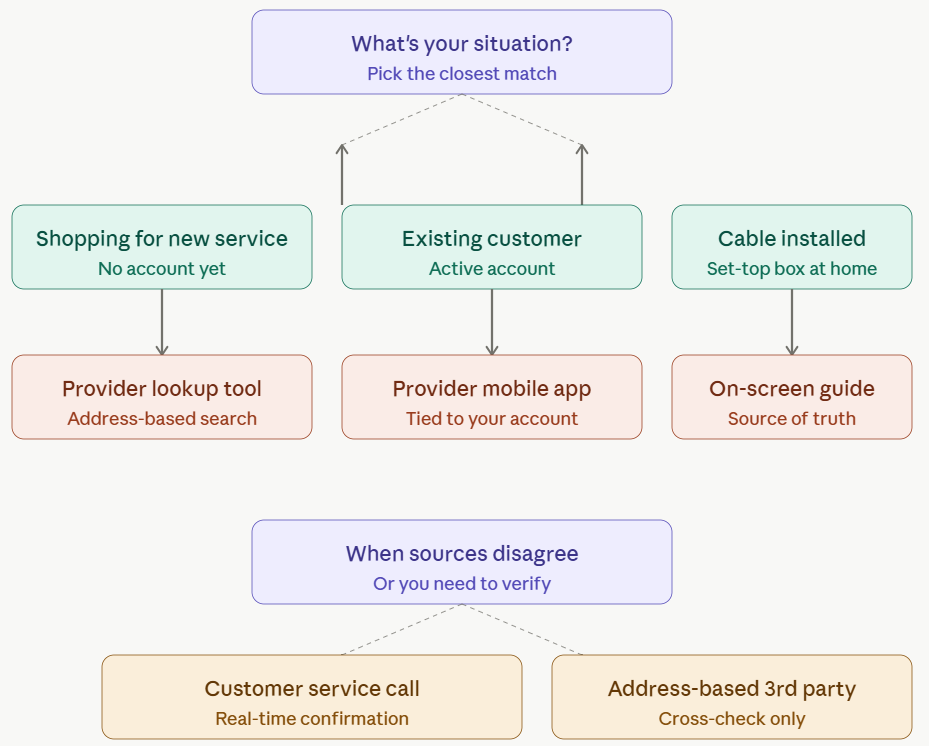
Five Reliable Sources, Ranked
Different sources work better in different situations. The following five are listed roughly in order of reliability for most cases.
1. The Provider’s Official Channel Lineup Tool
The most authoritative source is the cable provider’s own website. Major providers including Xfinity, Spectrum, Cox, Optimum, Verizon Fios, DirecTV, and DISH all offer address-based channel lookup tools on their corporate sites. Enter the service address or ZIP code, select the package or tier under consideration, and the tool returns the actual lineup for that home.
This is the right starting point for most lookups because the provider has the most accurate data about its own service. The lookup also typically lets the user filter by package, which is useful for confirming whether a specific channel is included in the tier being considered before signing up.
2. The Provider’s Mobile App or Account Page
For existing customers, the provider’s mobile app or signed-in account page is often more accurate than the public website. Apps like My Spectrum, Xfinity, and MyDirecTV show the actual subscribed lineup tied to the specific account, including any local variations or recent additions and removals.
The advantage of the app over the public website is currency. The public website shows what the lookup tool believes the lineup is for an address. The app shows what the account actually receives, which can differ slightly because of recent provisioning, package changes, or grandfathered carriage.
3. The On-Screen Channel Guide
For homes with cable already installed, the on-screen channel guide on the set-top box is the source of truth. It reflects exactly what the home receives, with the actual channel numbers in use, the actual local stations carried, and any recently added or removed channels.
The drawback is navigation. Scrolling through a cable guide to confirm whether one specific channel exists is slow compared to a website search. But for ground-truth verification, especially when other sources disagree, the on-screen guide is unambiguous.
4. Provider Customer Service
Calling customer service and providing the address gets a lookup performed by a representative. This is useful when the website is down, when the lookup tool is producing confusing results, or when verifying availability of a specific channel that matters enough to confirm with a human.
Customer service can also confirm whether a channel is included in a specific package, whether it requires an add-on, and what the cost difference would be between tiers. This is more useful than the website for someone weighing a package upgrade specifically to gain access to one or two channels.
5. Third-Party Verification When Sources Disagree
Third-party channel lineup sites can be useful, but only the ones that ask for an address or ZIP code. Generic lineup articles that list “Spectrum channels” without context should be ignored, because they cannot reflect local variation.
When a third-party site does ask for an address and shows a recent verification date, it can serve as a useful cross-check against the provider’s own lookup. If the two agree, the lineup is probably accurate. If they disagree, the provider’s source generally wins.
Quick Reference Table
| Situation | Best place to check | What to verify |
|---|---|---|
| Shopping for a new package | Provider’s official channel lineup tool | Address, package, local stations |
| Existing customer with active service | Provider’s mobile app or account page | Currently subscribed lineup |
| Cable already installed at home | On-screen channel guide | What the home actually receives |
| Critical channel availability question | Provider customer service | Package details and add-on requirements |
| Cross-checking the provider’s answer | Address-based third-party lookup | Recent verification date, matching results |
What to Verify When Checking a Lineup
A reliable lineup check covers six things, regardless of which source is used.
- The address used in the lookup matches the address where service will be installed, not a default or nearby ZIP.
- The package or tier selected matches the one being considered. ESPN appears on some Spectrum tiers and not others. The lookup must filter to the right tier.
- Local broadcast stations are listed by call sign, not just by network name. “NBC” is not enough. The specific affiliate (WNBC, WCAU, KNBC, or whichever) tells the user which local newsroom they will actually see.
- HD versus SD numbering is clear if it matters. Some providers show separate numbers; others show one consolidated number.
- Regional sports networks for the area are listed. RSN availability varies by city even within the same provider, and the lookup should reflect the local RSN, not a generic placeholder.
- The lineup has a recent verification or update date. Lineups shift, and a result from six months ago may no longer match what the provider currently carries.
Why the Answer Can Change After Sign-Up
A lineup confirmed at sign-up is accurate for that moment but is not a permanent guarantee. Cable lineups shift over time. Networks get added, dropped, or moved between tiers. Provider mergers can rationalize numbering schemes. Carriage disputes between cable providers and channel owners can remove channels mid-contract, sometimes with little notice.
Subscribers who care about specific channels should know this and check the lineup periodically rather than assuming it will remain unchanged. The provider’s mobile app is the easiest way to keep track of changes, since it always reflects the current state of the account.
What to Do When Sources Disagree
It is common for the provider website, the mobile app, and a third-party site to show three slightly different lineups for the same home. When this happens, trust them in this order: the mobile app for existing customers, then the official provider website, then any third-party source.
For a critical channel question, such as confirming that a specific show, sports package, or premium tier is actually available, calling customer service is worth the time. The website lookup tools occasionally lag behind real account-level changes, and a representative can confirm carriage in real time.
Across the lineup data reviewed for this project, the most common disagreement is between generic third-party lists and the provider’s own lookup. The third-party list shows a channel that the provider’s lookup does not return for the specific address. In nearly every case, the provider’s lookup is correct, because it accounts for local carriage that the generic list cannot.
The Short Version
The reliable way to find a real cable lineup is to use an address-based lookup, not a generic list. The provider’s own channel lineup tool is the most authoritative starting point. The provider’s app is the most accurate source for existing customers. The on-screen channel guide is the ground truth for homes with installed service. Customer service confirms anything ambiguous. Third-party sources are useful only when they too ask for an address.
The common thread is that any source worth trusting starts by asking where the home is. Anything that skips that step is producing a generic answer that may or may not match the actual lineup.
Leave a Reply