

YouTube TV and Hulu Live are two of the most widely considered live TV streaming services in the United States. They often appear similar at a glance: broad live-channel bundles, familiar local and national networks, and apps that work on most major devices. The differences emerge when households actually use them, and the right choice depends less on which service is “better” than on which one fits a specific household’s habits.
This guide compares YouTube TV vs Hulu Live and Hulu Live vs YouTube TV from a household-fit perspective, not just a feature-list perspective. Most comparison articles list features in a table and declare a winner. That framing is misleading because the two services are designed around different philosophies. YouTube TV was built as a standalone live TV service. Hulu Live was built as a live TV extension of Hulu’s existing on-demand platform. The household that benefits most from each service is determined by whether that design philosophy matches its viewing habits.
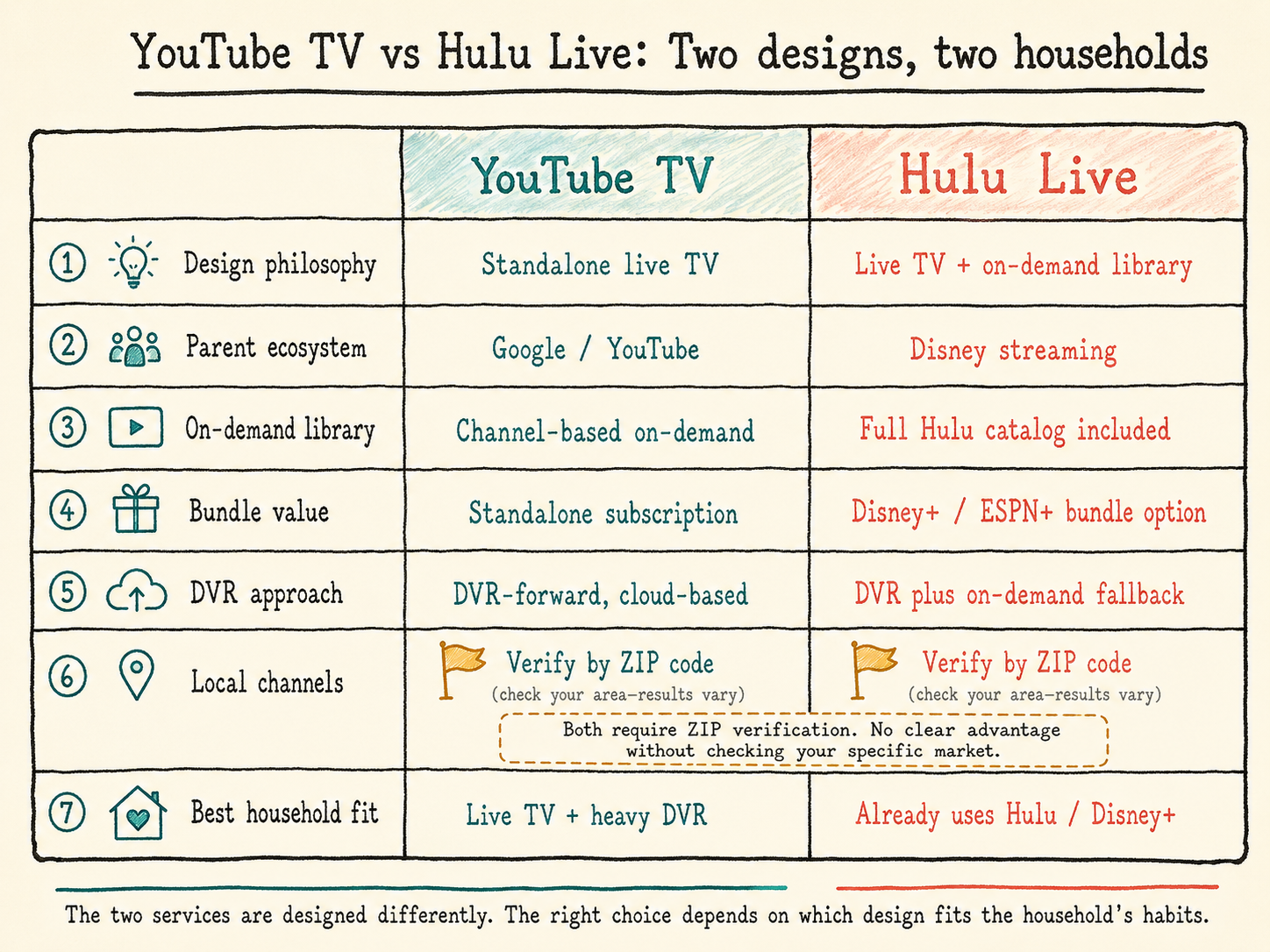
Streaming services change pricing, channel lineups, local availability, DVR rules, and bundle terms frequently. This guide focuses on structural differences, but readers should verify current details on each service’s official site before subscribing.
Quick Reference: Which Service Likely Fits Better
| What the household wants | Likely better fit |
|---|---|
| Simple live TV plus strong cloud DVR | YouTube TV |
| Already uses Hulu, Disney+, or ESPN+ | Hulu Live (with bundled tier) |
| A specific regional sports network | Whichever service carries it |
| Coverage of local broadcast affiliates in the household’s market | Verify by ZIP code on each service |
| Current-season network shows on-demand | Hulu Live |
| Integration with the YouTube ecosystem | YouTube TV |
The rest of this article explains why these patterns hold and how to think about the decision for a specific household.
The Biggest Structural Difference: Standalone Live TV vs Bundle-First Live TV
YouTube TV launched in 2017 and is owned by Google. It was designed as a standalone live TV service, with its identity centered on live channel coverage, cloud DVR, and integration with Google’s broader ecosystem (YouTube proper, Google Home, the Android and Chromecast ecosystems). It does not bundle a comparable on-demand entertainment library.
Hulu Live also launched in 2017 and is now part of Disney’s streaming portfolio. It was designed as an extension of Hulu’s existing on-demand platform. The live TV tier sits on top of Hulu’s on-demand catalog, which includes current-season network shows, Hulu original programming, and a large back catalog. Hulu Live is the same product as Hulu, plus live channels, plus optional bundling with other Disney services like Disney+ and ESPN+.
This structural difference shapes nearly everything else about the two services. Households that already value or use Hulu’s on-demand catalog get more from Hulu Live than from YouTube TV. Households that just want live TV without entertainment-library bundling find YouTube TV’s simpler structure easier to evaluate. Neither approach is better in the abstract. They are designed for different households.
Channel Coverage: Similar Nationally, Different Locally
Both services carry many of the same widely distributed national cable networks. Major sports networks, news channels, lifestyle networks, and entertainment networks tend to appear on both. On paper, the national-channel coverage can look similar, but the differences show up in local channels, RSNs, niche networks, bundles, and household features.
The differences appear at the local level. Local broadcast affiliate coverage varies by market and by service. Both services have expanded their local broadcast carriage substantially since launch, but neither has complete coverage of every affiliate in every market. Some markets have full coverage on both services. Some have full coverage on one and partial on the other. A household in a smaller metropolitan area may find that one of its local affiliates is missing from one service.
Channel coverage also differs in the niche cable categories. Smaller specialty networks, religious networks, and certain international channels may appear on one service and not the other. For households that watch these channels, the difference is decisive.
Local Channels and Regional Sports Networks: Verify Before Choosing
The single most important verification before subscribing to either service is local availability. Both services let prospective subscribers enter a service address or ZIP code on their signup page to see exactly which local affiliates and regional sports networks are available at that location.
Regional sports networks are the most common source of dissatisfaction after subscribing. The two services have different RSN portfolios, and the picture has been particularly fragmented over the past several years. A household that wants their local MLB, NBA, or NHL team’s RSN should verify the specific RSN on each service for their specific market, not assume that “they have sports.”
Local broadcast carriage is similarly market-specific. The household should confirm that the specific NBC, CBS, ABC, FOX, and PBS affiliates available at their address are present on the service they are considering. “We carry NBC nationally” is not the same as “we carry your specific local NBC affiliate.”
On-Demand Library and Bundle Value
The on-demand library question is where the two services diverge most clearly.
Hulu Live includes Hulu’s on-demand catalog: current-season network shows (often available the day after airing), Hulu’s original programming, and a substantial back catalog of older shows and movies. For households that watch a meaningful amount of on-demand entertainment, this is significant value bundled into the live TV subscription. A household that already pays for Hulu separately can effectively replace both subscriptions with Hulu Live.
YouTube TV does not bundle an equivalent on-demand entertainment library. It includes on-demand access to programming from the channels it carries (similar to cable’s on-demand offerings), but it does not include a separate Hulu-style catalog of original programming or back-catalog shows.
Hulu Live also offers a bundled tier that includes Disney+ and ESPN+ in addition to the live TV and on-demand library. For households that already pay for Disney+, ESPN+, or both, this bundled tier can change the cost calculation significantly. The same content paid for separately is usually more expensive than the bundled package. YouTube TV does not offer a comparable bundling arrangement.
DVR and Recording Differences
Both services include cloud DVR. The two have historically taken different approaches to DVR generosity.
YouTube TV has positioned its DVR as a competitive advantage, historically offering very generous storage and retention compared to most live TV streaming services. Recordings are saved in the cloud and remain available for an extended period. Households that record heavily and watch on their own schedule have generally found YouTube TV’s DVR experience to be the stronger of the two.
Hulu Live’s DVR has historically been more constrained, with shorter retention periods and storage limits that have changed over time. Hulu Live partially compensates for this through its on-demand library, where many shows are available without needing to be DVR’d in the first place.
Specific DVR rules change for both services. Before subscribing, the household should verify current DVR storage, retention, and any add-on costs for expanded DVR. The structural difference (YouTube TV emphasizing DVR, Hulu Live emphasizing on-demand) is durable; the specific specs are not.
Household Streams and Device Use
Both services support multiple simultaneous streams per account, with caps that have changed over time and with optional add-ons that increase the cap for larger households. The specific stream limits and any associated costs should be verified on each service’s signup page.
The two services have similar device support across smart TVs, streaming sticks (Roku, Fire TV, Apple TV, Chromecast, etc.), mobile apps, and web browsers. Most households will not find one service meaningfully better-supported than the other on the devices they actually use, though specific device-level features (4K streaming on certain channels, integration with Google Home or Apple HomeKit, etc.) can favor one service for households that care about those specifics.
Cost: Compare Total Value, Not Headline Price
Both services have raised prices multiple times since launch and tend to track each other closely on headline pricing. The cost difference between the two base tiers is usually small enough that pricing alone is rarely the deciding factor.
The meaningful cost comparison includes total value rather than just the headline number. A household that already pays for Hulu, Disney+, or ESPN+ separately may find Hulu Live’s bundled tier substantially cheaper than maintaining all those subscriptions individually. A household that does not use those services gets no value from the bundle and should compare the base tiers directly.
RSN add-ons, premium channel add-ons, and additional simultaneous-stream fees can also change the comparison. The realistic monthly cost includes whatever add-ons the household actually needs, not just the base subscription.
Who Should Choose YouTube TV
Several household types tend to be better served by YouTube TV.
- Households that want straightforward live TV without on-demand library bundling.
- Households that record heavily and value strong DVR functionality.
- Households already inside the Google ecosystem (Android phones, Chromecast, Google Home, regular YouTube viewing).
- Households that do not currently use Hulu, Disney+, or ESPN+, and would not benefit from the Disney bundle.
- Households where the local RSN they want is on YouTube TV but not on Hulu Live.
Who Should Choose Hulu Live
Several household types tend to be better served by Hulu Live, particularly its bundled tier.
- Households that already pay for Hulu, Disney+, or ESPN+ separately and would benefit from bundled pricing.
- Households that watch a meaningful amount of current-season network shows on-demand.
- Households with kids who watch Disney+ content and would value that being included.
- Households that follow college sports through ESPN+ programming included in the bundle.
- Households where the local RSN they want is on Hulu Live but not on YouTube TV.
Checklist Before Subscribing
Before committing to either service, the following checks reduce the risk of switching back later.
- Enter the household’s service address or ZIP code on each service’s signup page to see actual local channel coverage.
- Verify the specific regional sports network for the household’s area, not just whether sports networks generally are available.
- List the specific cable networks the household watches and confirm each is on the service being considered.
- Calculate total cost including any add-ons the household actually needs, not just the base tier headline.
- For Hulu Live: factor in the value of the Hulu on-demand library and the Disney+/ESPN+ bundle if the household uses or would use those services.
- For YouTube TV: factor in the strength of the cloud DVR for households that record heavily.
- Use the free trial on each service if one is available, particularly during the season for any sport the household follows.
- Verify current DVR storage, retention, simultaneous-stream limits, and any associated costs directly on each service’s website, since these specifications change.
Across the comparison data reviewed for this project, the most common cause of regret after subscribing is failing to verify either local channel coverage or specific regional sports network availability before committing. The two services are similar enough on most other dimensions that local availability and household-specific use patterns drive the decision more than any feature difference.
The Short Version
YouTube TV and Hulu Live are similar enough that the choice between them is rarely about which is “better.” The decision usually comes down to a few specific factors: which service carries the local channels and regional sports network the household needs, whether Hulu’s on-demand library is valuable to the household, and whether the household already uses Hulu, Disney+, or ESPN+ enough to benefit from Hulu Live’s bundled tier.
The best approach is to verify local availability for both services, evaluate whether the on-demand library and Disney bundle add real value for the specific household, and then make the decision based on actual use patterns rather than feature lists. Both services change pricing, channel lineups, DVR rules, and add-on structures regularly, so any specific spec should be verified on the service’s own website before subscribing.
Sources and Further Reading
Note: Streaming prices, channel lineups, DVR rules, and bundle terms change often. This guide focuses on structural differences and should be verified against each service’s current signup page.
- YouTube TV, Official site — current channel lineup lookup, pricing, and feature details
- Hulu, Live TV plans — current channel lineup, bundled tier, and pricing
- FCC, Online Video Distribution — overview of how internet-delivered video services are regulated
- S&P Global Market Intelligence, Kagan Media Research — industry reporting on live TV streaming subscriber trends and service economics
Leave a Reply